A music videos game gives fans clues from a video and asks them to solve a visual puzzle before the release-day reveal. Use a recognizable detail, publish hints on a fixed schedule, and link the answer to the full video. YouTube Premieres provide a shareable watch page before playback, so fans can gather before the song starts.
- Give new listeners answer choices. They should be able to solve the puzzle without knowing an unreleased song.
- Build clues from approved footage, then send the reveal directly to the full-song video.
- Keep the game prize-free for a simpler release-day rollout. Prizes introduce contest rules and platform requirements.
Choose a Music Video Guessing Game Fans Can Solve
A good music video guessing game gives fans enough evidence to reach an answer. The format depends on what your audience already knows.
A longtime listener might recognize a jacket from an earlier video. Someone discovering your debut single needs clues that work without that history.
| Game format | Best fit | What makes it solvable |
|---|---|---|
| Cropped-frame reveal | A new single or debut release | A recognizable object, with answer choices and a wider reveal |
| Muted-clip challenge | An artist with an existing video catalog | A distinctive scene fans have already seen |
| Missing-lyric challenge | A single with a publicly available preview | A lyric listeners can hear in the preview |
We recommend the cropped-frame reveal for a brand-new release. It lets unfamiliar listeners participate while introducing the video's visual world.
Choose an object that remains readable when cropped. A moon-shaped pendant can work. A tiny reflection that only makes sense after watching the entire video will frustrate people.
Avoid asking fans to identify an unreleased song from an unfamiliar scene. Without a public clue connecting the scene to the title, that is random guessing.
Build the Clues Around the Full-Video Reveal
A release-day game needs a fixed answer and a clear destination. Decide both before exporting any teaser clips.
If the video is still being made, include the clue shot in your music video production workflow from treatment to final master so it survives the final edit. A game built around a deleted shot creates unnecessary work close to release.
-
Lock the answer. Write one unambiguous solution and confirm it appears in the approved master. Decide exactly when you will reveal it.
-
Prepare the clue sequence. Start with a tight crop, then widen it or add a useful text hint. Export every clue from the same approved shot so the object keeps its shape and color.
-
Publish the opening clue with complete instructions. State what fans should guess, where they should reply, and when the answer arrives. Link the premiere watch page from the first clue rather than waiting until the reveal.
-
Reveal the answer when fans can verify it. Coordinate the reveal with the relevant scene becoming visible. Update the original post or pin an answer comment, then point directly to the full video.
For vertical adaptations, check the clue on a phone. An object near the edge of a widescreen master may disappear in a vertical crop or sit beneath interface controls. Reposition the crop before posting.
When the release date is close, keep the production burden small. Reusing an approved shot avoids a separate teaser concept and reduces the chance of visual continuity breaking between the game and the finished video.
A Complete Release-Day Game You Can Copy
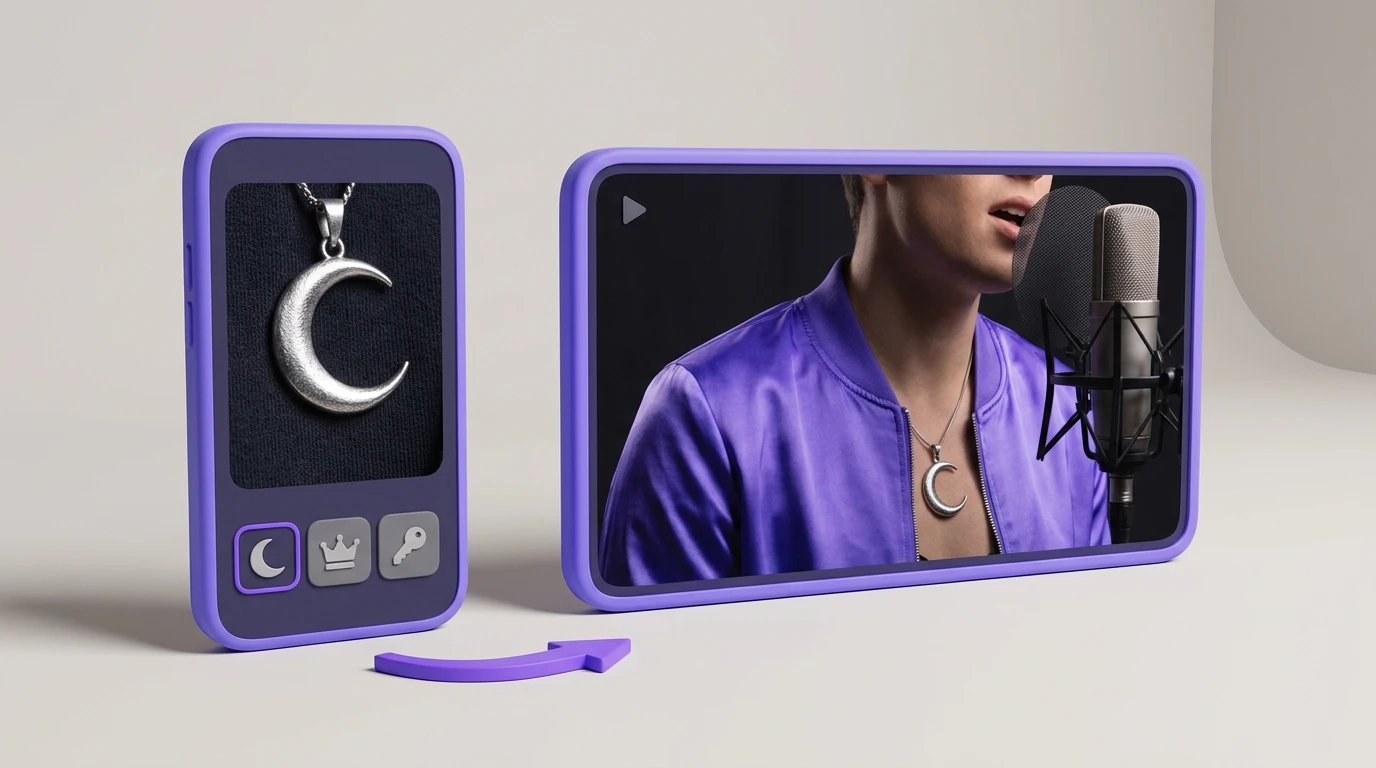
Say your new video opens on a crescent-moon pendant. You schedule the premiere for 18:00 UTC and use the pendant as the puzzle.
The answer choices are a moon, a crown, or a key. The first clue shows only part of the pendant. The next hint makes the answer reachable even for someone who has never heard your music.
| Timing in this example | Post copy | Purpose |
|---|---|---|
| 16:00 UTC | “Which object opens the video: a moon, a crown, or a key? Leave your guess below. Premiere at 18:00 UTC: [premiere link].” | Establish the question and give fans a destination |
| 17:00 UTC | “Hint: look to the night sky. Keep your guess in the original thread. Premiere at 18:00 UTC: [premiere link].” | Help newcomers solve it without scattering replies |
| 18:00 UTC | “The premiere countdown is starting. Watch the opening scene for the answer: [premiere link].” | Move attention from the clue to the video |
| After the opening scene plays | “The answer is the moon pendant. Watch for it in the opening scene. Full video: [video link].” | Resolve the puzzle and keep the full song accessible |
For a YouTube Premiere, account for the countdown before playback. Do not schedule an answer post that spoils a scene before viewers can see it.
The game should still make sense to someone arriving late. Add “Answer revealed” to the original post once the solution is public, and keep the full-video link easy to find.
Use this blank version for your own release:
OPENING CLUE | [DATE, TIME, TIME ZONE]

Which [OBJECT / LOCATION / LYRIC] appears in [SONG TITLE]?
Choose: [OPTION A], [OPTION B], or [OPTION C].
Leave your guess in [REPLY LOCATION].
Answer revealed at [REVEAL TIME AND TIME ZONE].
Watch the premiere: [PREMIERE LINK]

FOLLOW-UP HINT | [DATE, TIME, TIME ZONE]

Hint: [CLUE THAT HELPS A NEW LISTENER].
Keep your answer in [ORIGINAL REPLY LOCATION].
Premiere: [PREMIERE LINK]

REVEAL | [AFTER THE RELEVANT SCENE PLAYS]

The answer is [ANSWER].
You can spot it during [SCENE].
Watch the full video: [VIDEO LINK]
Keep Participation Fair and the Release Easy to Follow
A release-day guessing game should explain how to participate without making fans hunt for instructions. Use one main answer thread, state the time zone, and give the clue a text equivalent that preserves the puzzle.
For the pendant example, “a silver curve against a dark background” describes the visible evidence without giving away the answer. Avoid relying entirely on sound or subtle color differences. Fans may be watching muted or using assistive technology.
Keep the default version prize-free. Fans can participate for the reveal itself. If you add a giveaway on YouTube, its contest policies require free entry and official rules, alongside other requirements. Check the rules of every platform involved and any applicable local requirements before announcing a prize.
Permissions matter even when the footage is yours to release. When you choose a video production company, confirm that your agreement covers promotional excerpts and access to suitable files. Clear any additional music or third-party material used in the clue posts.
Make the destination specific. Send fans to the actual premiere or full video rather than a profile where they must search again. A short teaser earns attention, but the release still needs a route to the complete song.
Frequently Asked Questions
Where can fans play a music video guessing game for free?
Fans can participate through comments on your existing social posts or a YouTube premiere watch page, subject to the platform's access requirements. A separate game website is unnecessary for a simple clue-and-reveal format.
Can I use another artist’s music video for a guessing game?
Do not assume that a short excerpt is automatically permitted. YouTube’s guidance on common copyright myths explains that even a few seconds can create copyright issues. Use material you control or have permission to use unless you have a sound legal basis for the specific use.
How should I measure release-day fan engagement?
Track unique participants and correct guesses, then check whether people followed the link to the premiere or full video using the analytics available to you. Keep those measures separate from total post views, which do not show whether someone played. Without a comparison, avoid claiming that the game caused an increase in video views.
Lock the pendant reveal to the moment fans can verify it, then prepare the clue posts before release day gets busy. If your finished single still needs its visual world, get in touch about your release with SongTrailer, where one creative director leads a human-directed, AI-assisted full-song video through delivery of the master and social-ratio adaptation.